✓ $800,000+ worth of products unlockable for free!
|
✓ Unlock Products Tools & Addons for Free. ✓ $800,000+ worth of products unlockable for free! |
|
Trinity Pumps for G8F/G9 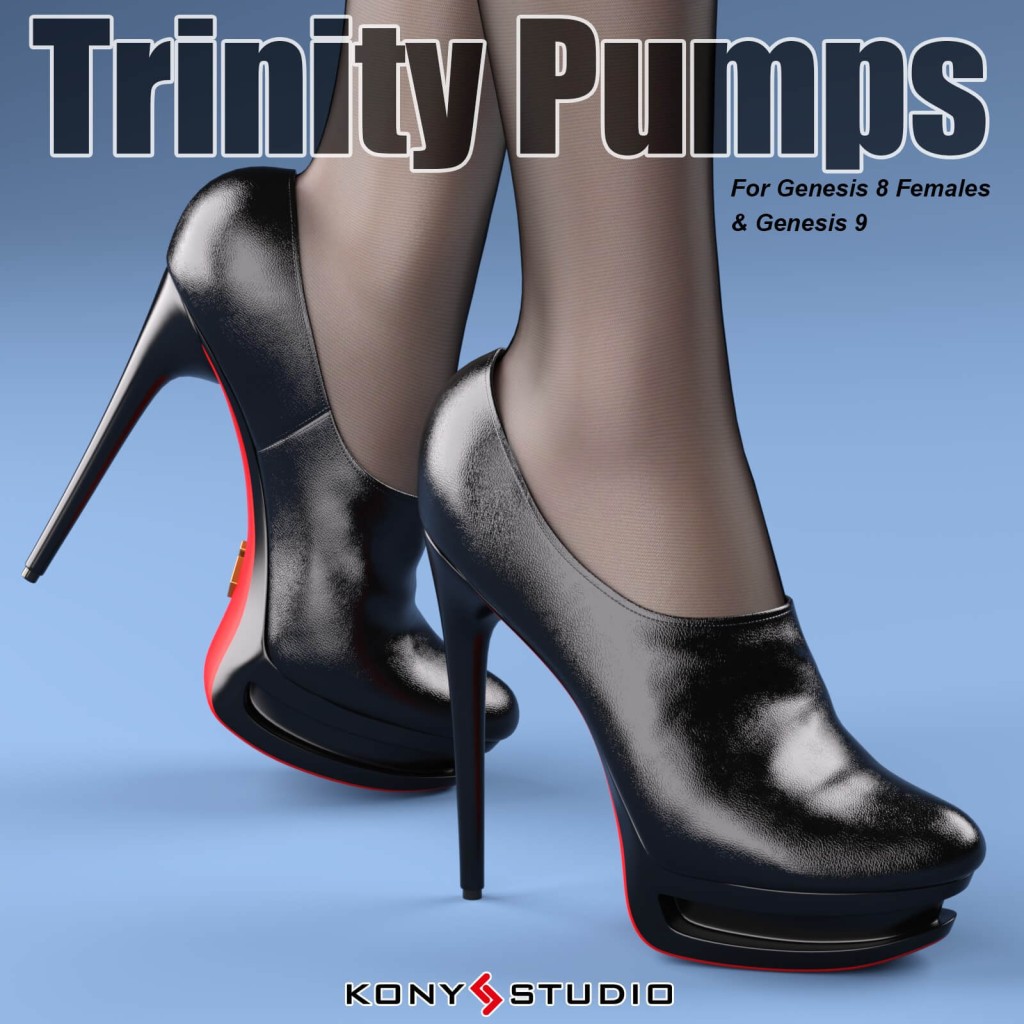
Trinity Pumps for G8F/G9
Trinity Pumps for G8F/G9 ------------------------------------------------------------ This product was tested in Daz Studio 4.9 on PC. ------------------------------------------------------------ This product was created for Daz Studio 4.9. ------------------------------------------------------------ Conforming Footwear figure "Trinity Pumps G8f" for Genesis 8 Female Conforming Footwear figure "Trinity Pumps G9" for Genesis 9 Pose "Foot Pose" & "Foot Pose Reset" both for Genesis 8 Female and Genesis 9 14 Shoes Styles, 4 Sole styles, 2 logo styles in Iray materials Multiple morphs in boots figure to change the style of boots. "Trinity Pumps G8f" Contained Genesis 8 Female body shape morphs "Trinity Pumps G8f" Contained G8F Characters Morphs: "Trinity Pumps G9" Contained Genesis 9 body shape morphs and Victoria 9 Most other body shape morphs can be fit with Daz Studio's Auto-follow Texture template JPG file for Trinity Pumps (in textures directory) This Readme file in Documentation directory ------------------------------------------------------------ To use for G8f/8.1f, just select the G8F/G8.1F figure in your scene, then double click the "Trinity Pumps G8f" figure (in directory People/Genesis 8 Female/Clothing/Kony/Trinity Pumps) to apply the boots figure to the G8f figure,and double click the "Foot Pose for Lorelei G8f" to apply the foot pose to the G8f figure. To use for Genesis 9, just select the Genesis 9 figure in your scene, then double click the "Trinity Pumps G9" figure (in directory People/Genesis 9/Clothing/Kony/Trinity Pumps) to apply the boots figure to the Genesis 9 figure,and double click the "Foot Pose Lorelei for G9" to apply the foot pose to the Genesis 9 figure. For some reasons, when the boots model is fitted to the G8/G9 model, there may be slight deformation or mold wear problems, which are caused by some internal morphs of G8/G9. You can try to use "Shoes shape fix" to solve these problems: While the boots are fitted to the G8/G9, select the boots, then double-click "Shoes shape Fix", so that the boots model will ignore some internal morphs of the G8/G9 and return to a more normal shape. Multiple morphs in boots figure can be used to change the shape style of the boots. If your want to remove the Trinity Pumps(G8f/G9) figure, select the shoes figure in your scene and right click to delete it, and select the G8f/G9 figure, double click the "Foot Pose Reset" in Trinity Pumps (G8f/G9) library directory to reset the G8f/G9 figure foot pose.

📁 Clothing 🔖 |
 Trinity Pumps for G8F/G9
|