|
dForce Companion (UD v1.0.1.0)
 Rating: (4.5)
dForce Companion (UD v1.0.1.0)
Details
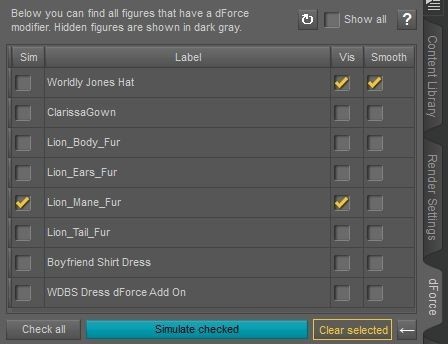
This new plugin for Daz Studio 4.12 and above simplifies your work with dForce (hair and cloth). It provides a new "dForce" pane in your Daz Studio user interface. This has two main features:
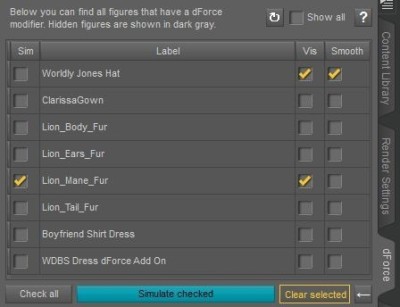
The pane shows you all the figures from your Scene tab that has a dForce modifier in one place. Especially with hair, it's often not immediately clear which node has the dForce modifier with the important settings in the parameters.
For each figure, you can only simulate that figure (and freeze the simulation for others), as well as turn on/off the Visible in the simulation flag and the smoothing modifier, if present. You can quickly reset the simulation data for each figure.
This greatly speeds up setting up dForce simulations, especially if you have multiple cloths or hair items in the scene that you want to simulate separately. No more digging in the scene tree in which items are dForced! No more simulating the wrong item accidentally!
Note: This plugin is for Windows 64-bits only. A version for the Mac may be added at a later time.
What's Included and Features
dForce Companion
New "dForce" pane for Daz Studio user interface
Shows all figures from the "Scene" tab with dForce modifiers
"Show all" checkbox to include figures without dForce modifiers as well
Checkboxes in "Sim" column select or deselect figures for simulation (by reversely enabling their "Freeze simulation" properties)
Checkboxes in "Vis" column for "Visible in simulation" properties
Checkboxes in "Smooth" column for "Enable smoothing" properties
"Check all" shortcut button
"Simulate checked" button to start simulation
"Clear selected" button to clear simulation data for selected figures
Arrow button to rewind the animation to frame 0
Resolved Issues
03-09-2020 - Renamed the “dForce” tab (pane label) to “dForce Companion” to avoid confusion
Install:
Put "MF_dforce.dll" in the program's plugin folder (X:\Program Files\DAZ 3D\DAZStudio4\plugins)
📁 Tools
🔖 67493, Daz 4.12 and above, dForce, Helper, panes, Tools, ZIP, Plugin
|
|